SSL Certificates
Highest Rated Hosting on Trustpilot


Why an SSL Certificate is Important For Your Website

Improves Security
SSL stands for Secure Sockets Layer. In layman’s terms, it creates an encrypted connection between the device of the visitor and your website. In that way, all the data transmitted between both sides is in cryptographically encoded format. This includes personal details, login and registration forms, and payment information.

Shows You Are Trustworthy
Web browsers have begun a transition to a more secure web, and their user interfaces have started reflecting on that by showing warnings on sites not protected with an SSL certificate. When you have an SSL certificate, visitors get a reassuring padlock showing that the connection is fully secured.

Helps SEO
Back in 2014, Google announced that HTTPS would be used as a ranking signal as part of their initiative to make the Internet safer for everyone. In result, websites with an SSL certificate get a slight ranking boost. This would serve as an advantage compared to websites that don't have a certificate.
Commercial SSL Certificates


Free SSL Certificates From Let's Encrypt
Benefits of Our SSL Certificate Offerings

Free SSL Certificates
All our hosting plans support the free Let's Encrypt SSL certificates. With all single-site VPS hosting plans and Business Plus, you also get a RapidSSL® certificate for free.

No Installation Fee
We do not impose an installation fee on SSL certificates. The Control Panel allows you to easily perform the procedure yourself or you contact our support team, and they will install it for you at no extra cost.

Customer Support Included
Are you having problems switching your website over to HTTPS? Are you getting mixed content errors at your website? Don't worry. Our support members will help you set up an SSL on your website free of charge.
Frequently Asked Questions
What is the difference between Let's Encrypt and Commercial certificates?
Let's Encrypt certificates adhere to the same security standards and provide the same level of encryption as commercial certificates. However, Let's Encrypt certificates have a much shorter validity period of just 90 days compared to one or two years for commercial certificates. The short validity period could pose a problem due to the need for regular renewals. We have taken care of this on our side by automating the renewal process, so your certificates will remain valid until you manually deactivate them.
I get an error message saying the website is not secure. How do I make it secure?
To be able to access your website over HTTPS, you need an SSL certificate installed for your domain. You can opt to purchase a commercial certificate from us or from a third-party, or you can install a free certificate from Let's Encrypt. To order a commercial certificate from us, please navigate to the comparison table above.
How do I install a Let's Encrypt certificate for my website?
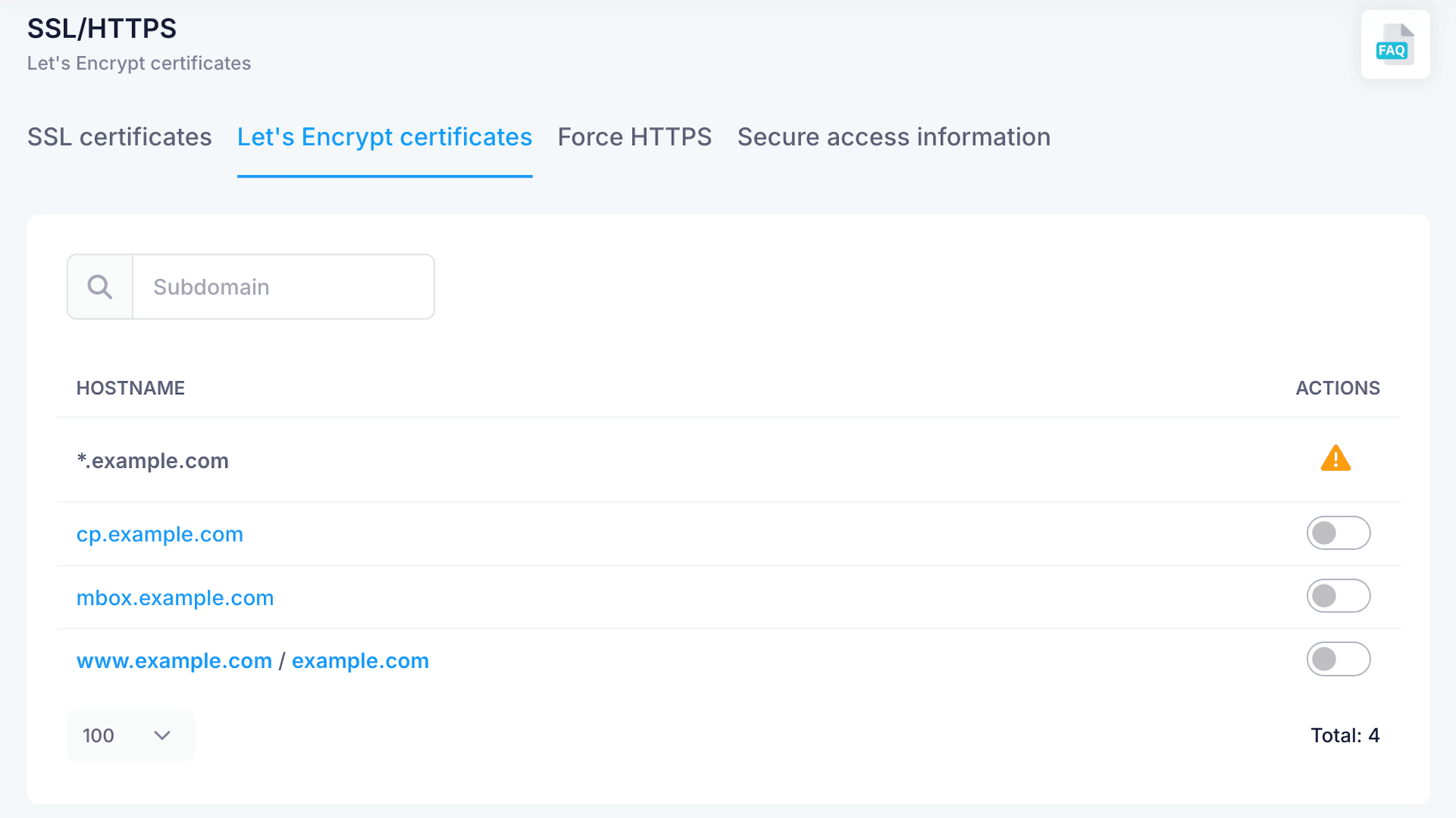
You can install Let's Encrypt certificates for your domains/subdomains/parked domains through the hosting Control Panel -> section SSL/HTTPS -> Let's Encrypt certificates. In this section, you should select the hostname for which you want to issue a Let's Encrypt certificate. If you want to have a certificate issued for all subdomains of a domain name, you should create a certificate for the * (wildcard) subdomain. Once you make your selection, press the "Enable" button. Doing this will automatically request certificates for the chosen hostname(s) and will have them installed on the server. If the selected hostname (domain/subdomain) does not point to our hosting service, you will not be able to issue and install a Let's Encrypt certificate for it. This is due to the specifics of the issuance of Let's Encrypt certificates. Attempts to issue a certificate for a hostname that does not point to our service will fail.
I installed an SSL certificate, but the website still shows as "Not secure". How do I correct this?
You will need to reconfigure the website to work over HTTPS. You can try forcing a redirection to HTTPS from the Control Panel -> SSL/HTTPS -> Force HTTPS -> click on the "Enable" button next to the hostname in question. In most cases the redirection to https:// will work without issues.
However, if your site includes images or other resources loaded via hard-coded http:// links, you will need to manually edit these links, so that they load via https://. Otherwise, you will receive mixed content warnings in some browsers.
If you are using WordPress, the "Force SSL" option in the Control Panel might not be sufficient. In such cases, you can refer to our blog post for instructions on how to move WordPress to HTTPS, or you can contact our Support Team.
Can I get a Let's Encrypt SSL certificate for a parked domain?
You can enable a Let's Encrypt certificate for any domain that's parked or set as main under your hosting account. There is no limit to the number of Let's Encrypt certificates you can activate. The only requirement is that the hostname in question points to the default IP address of your hosting account with us. The IP address is listed on the left pane of the Control Panel (IP addresses -> default).
I bought an SSL certificate from a third-party. Can I install it here?
Yes, you can purchase an SSL certificate from a third-party and install it via the Control Panel -> SSL/HTTPS -> SSL certificates. The hostname in question must be pointed to our server. The certificate files should be in PEM format, in a version for Apache + Mod_SSL web server. You will typically receive three pieces of information, usually in separate files: Private Key, Personal Domain Certificate, Intermediate Certificate Bundle.
Can I secure the Webmail with a Let's Encrypt certificate?
The Let's Encrypt certificates manager allows you to install a Let's Encrypt certificate for mbox.your_domain.com, which is the location of your Webmail program.
To enable the certificate for your Webmail, you simply need to locate the mbox.your_domain.com hostname in the list of domains/subdomains in the Let's Encrypt certificates manager, check the box in front of it, and use the "Enable" button. If you have parked domains on your account and you use any of them to access your Webmail program (e.g. mbox.parked_domain.com), you need to enable a certificate for each domain. If you enable a certificate for your * (wildcard) subdomain, it will be effective for your mbox subdomain as well.
I purchased an SSL certificate for the wrong hostname. Can I have it reissued for the correct one?
RapidSSL and QuickSSL Premium certificates can be cancelled and refunded within 5 days from the purchase date. The free refund period is extended to 25 days for Sectigo Essential and Wildcard certificates. During this period, you can cancel your certificate order and receive a full refund or have us reissue the certificate for another hostname.